Building a complex navigation system for the socially impactful project.
The projectChallange
To create a navigation system with ThreeJS and math.
My role
As a junior developer in the team, I was looking for development solutions to contribute to the project.
Intro
The main idea of the project was to unfold the story of the people and their struggles in Evin prison. The vision was to blend the AI-generated visuals, audio, 3d space and animations to create a visual and interactive narrative.
The most challenging part was to find the overall format of the result. In such projects, it is very crucial to maintain close and efficient communication between the design and development teams because the designers' ideas might imply a partial if not complete rework of the codebase. For the dev team and me, it was the case. I was tasked to create a navigation system based on the reference and midway when the navigation was complete it was decided to rework the system completely which had set back the progress for weeks.
Understanding the challenge
So what do I mean by navigation, you may ask? Navigation - is a system of methods that form paths along which the camera is moved, in other words, it is how the camera is moved around the 3d space. Imagine you are in a room with two images that are positioned on walls opposite to each other. The task is to let the user know that images are clickable, and the challenge is to define how the camera is moved. For example, the camera can be controlled like in video games with WASD or arrow controls. The problem with The WASD-like approach is that the experience would resemble a game which was unwanted.
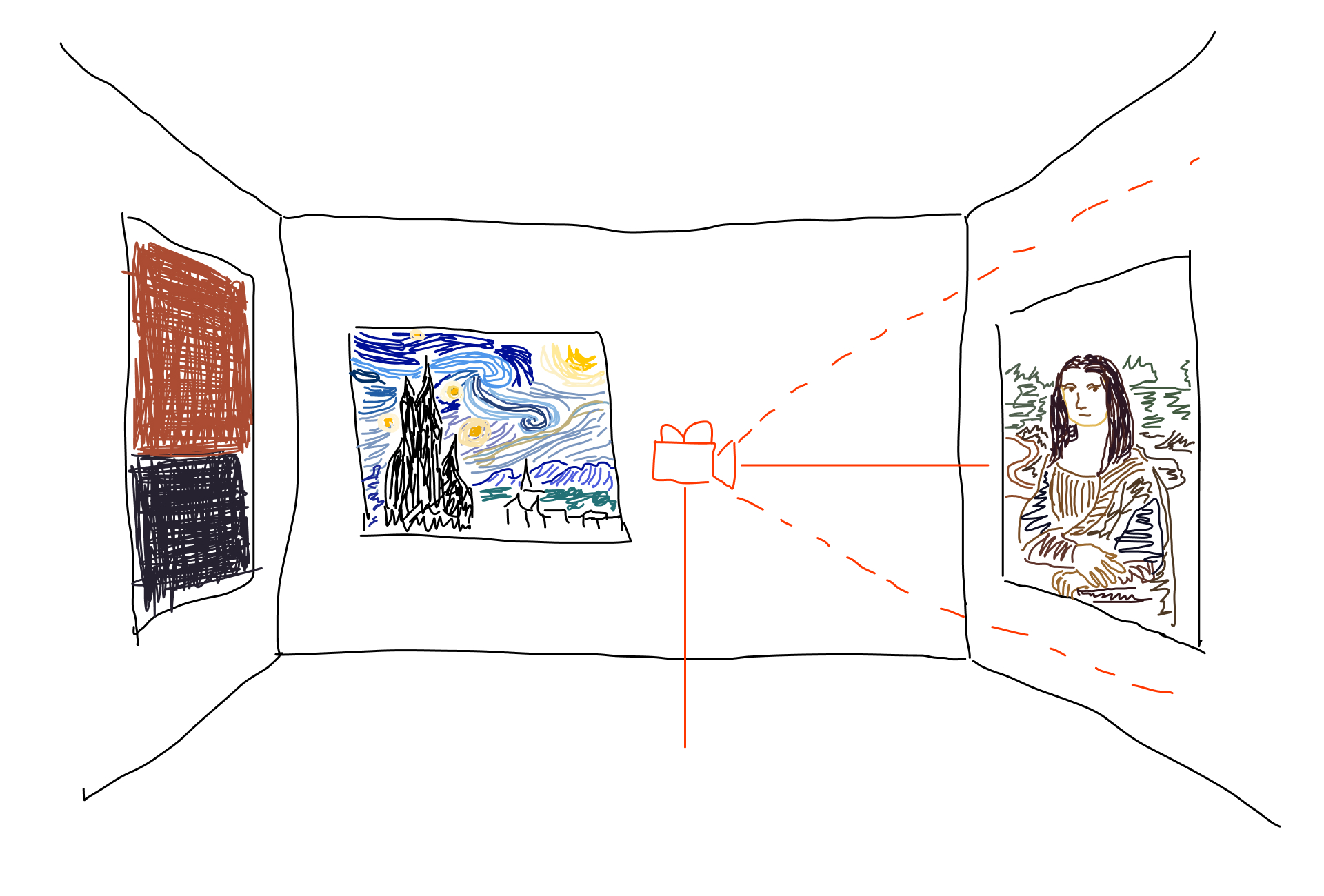
Room with paintings and a camera.
First version
Analysis
To begin I was given a reference, and my task was to create a similar navigation system. The idea is that there is a scene, and a camera that moves along a path, and this path has points where the camera stops for further exploration. However, the camera does not have complete freedom of rotation, only partial rotation but generally the direction in which the camera is pointed is scripted.
Curves and positions
The very first requirement for navigation is the ability to move the camera alongside the specified path. How to do that? Well, ThreeJS provides Curve() class which has getPoint() and getPointAt() methods. What do they do? You call those methods with a value in the range [0, 1], where 0 is the beginning point of the path and 1 is the endpoint, and it returns a precise coordinate of any value.
There are many ways of creating curves, one of them is to write an equation, like this one, but it does not really fit the theme of a room and format of our development process where changing the environment would consequently affect the path and there would be a need to rewrite the formula. The other method is to create a set of points in the space and then connect them with CatmullRomCurve3. Manually going through each point and shaping the curve.
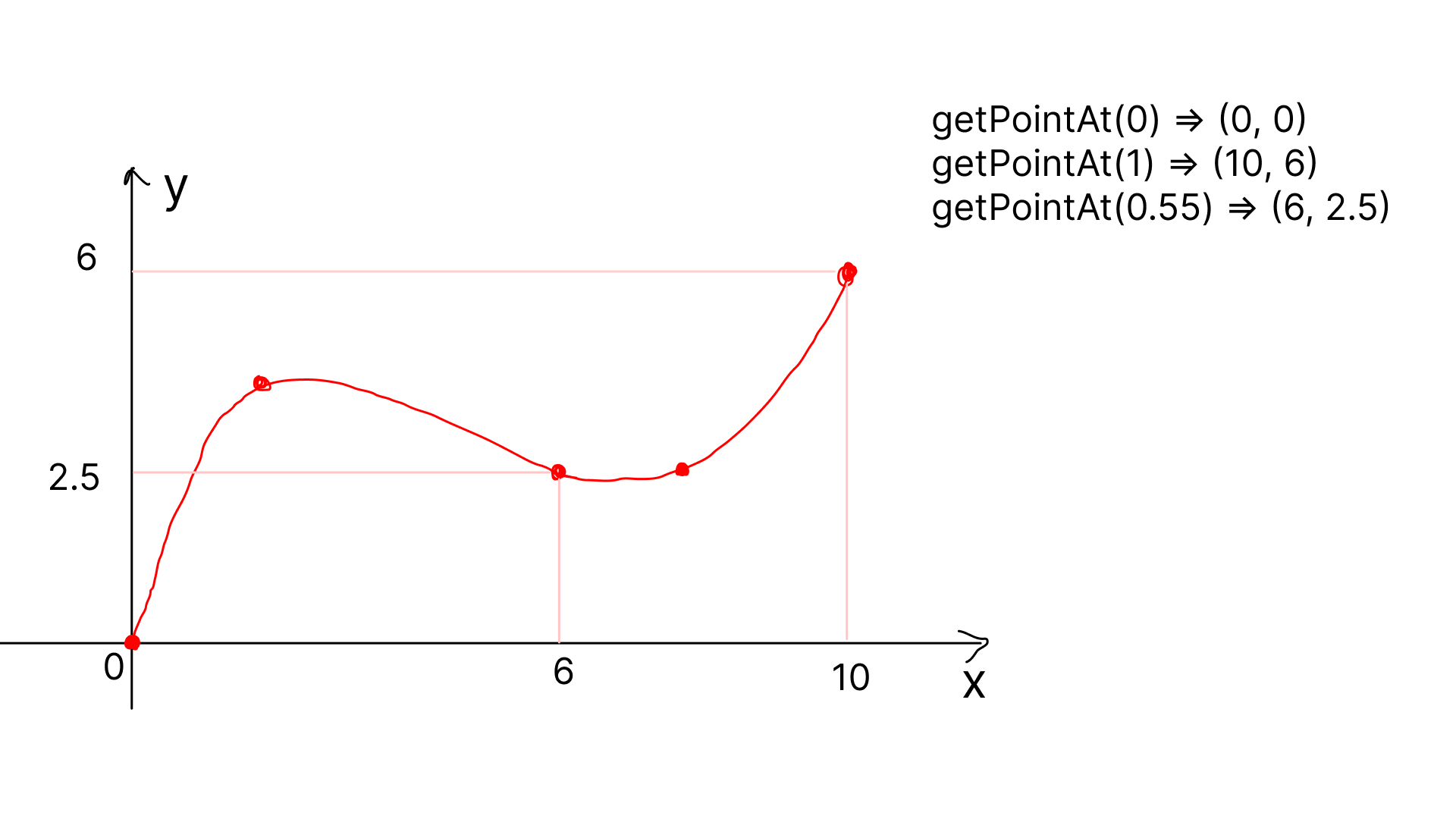
Curve and getPointAt() function.
Now that we have a way to get positions on the space, it is simply a matter of transitioning the value from 0 to 1 to move the object along the curve. Obviously changing the position of the camera is not enough, you need to point it somewhere. How to do that? The simplest way I could think of was creating another curve which would return the point at which the camera is directed, with the help of the lookAt() method.
Yellow - camera, purple - target. Movement demo.
Rotations
You may notice that the camera is hard-locked on the target, but the idea was that there is some level of freedom in rotation. That is the downside of the lookAt() method. What could be a workaround? Well, I guess there are libraries that handle such cases, but I wanted to implement it myself. So my solution to this problem was figuring out the angle (let us call it "alpha") between two points and then rotating the camera by that angle for each frame. That way alpha can be adjusted accordingly depending on the position of the mouse on the screen.
But how do you calculate the alpha? Trigonometry! Simply create a third point by taking the x-coordinate from one point y-coordinate from another and create a new point such that you have a right-angled triangle. Then you calculate the sides of the said triangle by subtracting the coordinates. sin(alpha) = opposite/hypotenuse. alpha = arcsin(opposite/hypotenuse). Hypotenuse is calculated using the Pythagorean theorem. Now you have your general angle by which your camera is rotated.
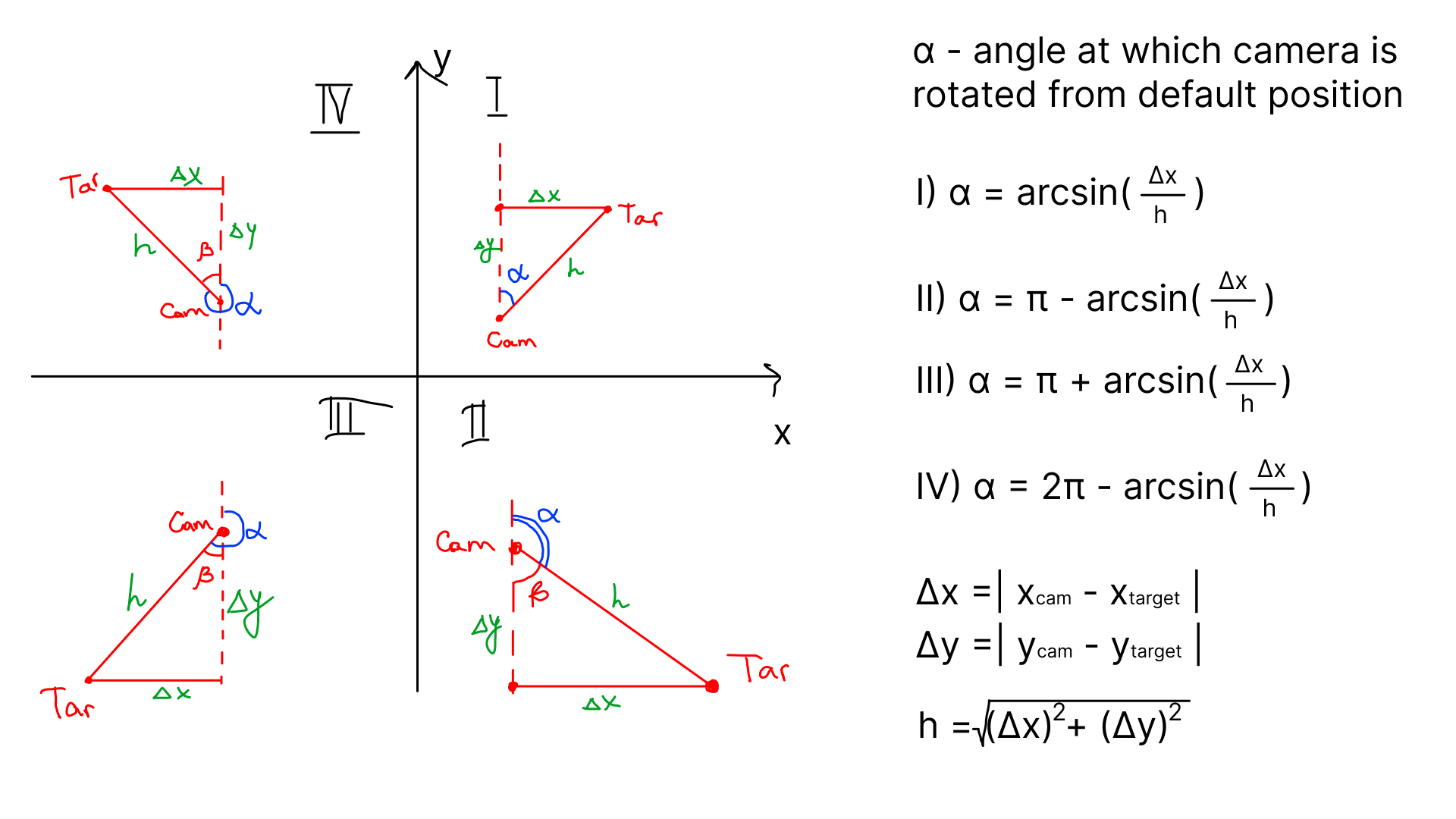
Calculating the camera rotation angle relative to target.
The next step is to get the position of the mouse on the screen, normalise it and map the position to the values of [-1, 1]. Now you have a coefficient by which you want to rotate your camera. Multiply it by the maximum value of the range, for example, 20 degrees and consequently your camera can rotate horizontally and/or vertically by ±20 degrees, let us call it beta for horizontal angle, and gamma for vertical angle. However, there will be a problem when you will rotate the camera vertically. The problem is in the local and global axis. When you transform (rotate) the object around its local axes for example x-axis and then rotate around its y-axis, the result might not look like what you might imagine. That is why for the desired effect we rotate the camera horizontally around a global (yes, global!) axis and vertically around its local axis.
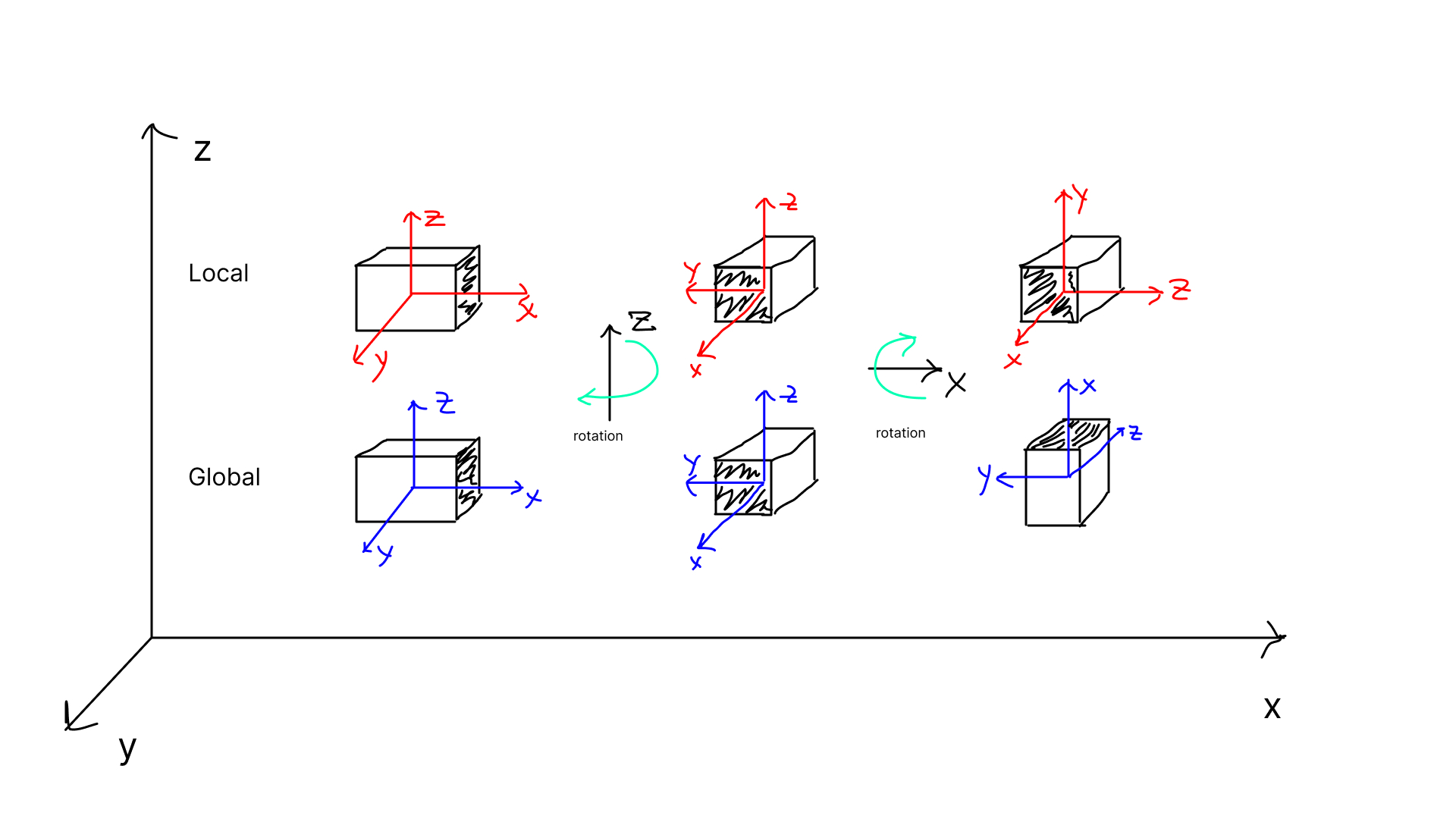
Global and local transformations of Cuboid.
By mixing the rotation calculations and cursor interaction we get the result.
Demonstration of the first navigation.
Second version
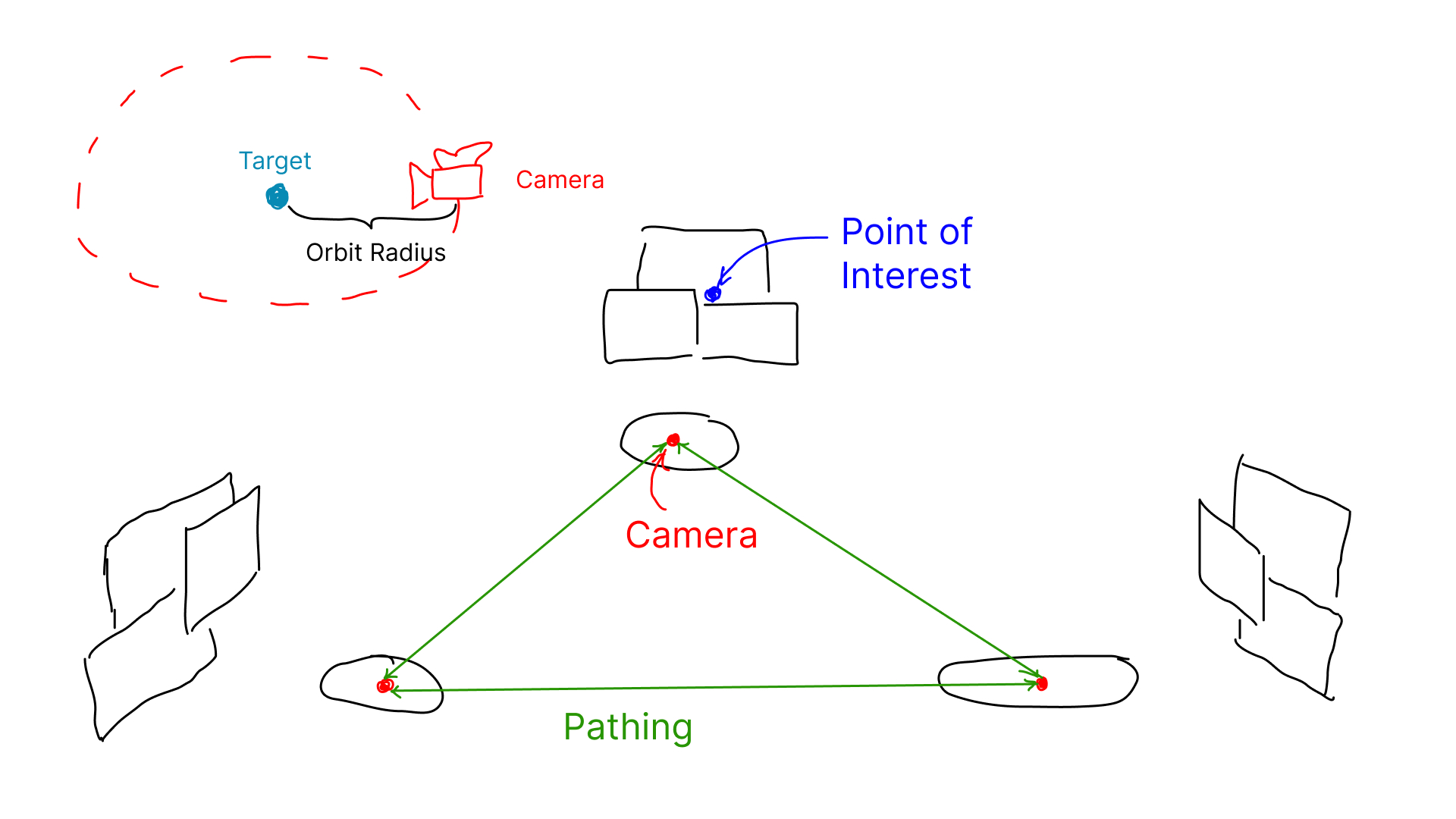
If you have opened the project you can notice that the navigation is different, for some reason, the clients wanted to switch the experience from fully scripted paths to something like Google Maps Street View. In short, there are spots in the scene and the user has the freedom to choose which spot to go to and explore the images closer. Spots are connected via Curves. The camera has complete freedom in terms of rotations.
Implementation
The second version is much easier in terms of implementation: simply create a collection of points/paths that connect the spots, and map the paths to spots by detecting the current spot the camera is standing on the clicked spot and get the required path. For the camera controls we used native OrbitControls.
Global and local transformations of Cuboid.
Challange
While simply putting paths and spots and OrbitControls together does most of the job, it is still not enough for a smooth experience. As a feature to improve the experience I was requested to make the transitions smoother: by transitioning the camera direction from the initial direction it was pointed to the spot's point of interest (e.g. the group of images). How to do that? To achieve the desired effect I had to understand how OrbitControls would work internally, and change the module itself for our custom needs.
How does OrbitControls work internally? Basically, it is a point (target) in the space around which the physical position of the camera rotates like an orbit. The camera is pointed at the target with the lookAt() method, and in order to imitate the dragging, zooming, and panning, the camera simply moves around/with the target.
In order to imitate the smooth transition, I decided to create a path from the point where the target was located to the point of interest. However one cannot simply move the target across the scene asynchronously to the camera, it is important to preserve the initial distance between the target and the camera. This is why after finishing the movement of the target and the camera I move the target from the point of interest to the initial relative position to the camera to preserve the consistent distance at all times when the user has control over the camera.
Demonstration of the final navigation.
Conclusion
Now, I understand better how math and motion are combined together to bring such experiences to life. I did not anticipate to do this much math, but in the end I am proud of the contribution I made to the project.